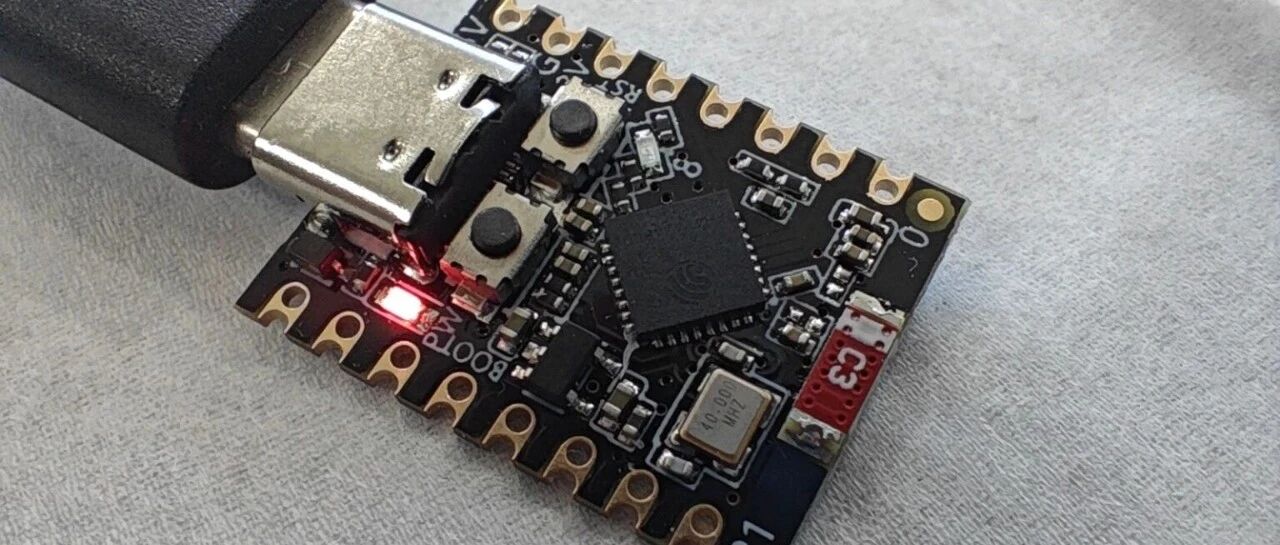
早就听说 Rust 可以用于嵌入式开发,这次我在 ESP32-C3 SuperMini 开发板上亲自尝试了一下,体验非常好,甚至有点超乎预期。
这个闪灯程序,是在我几天前就已经配置好的 Rust 开发环境中完成的。首先需要安装 esp-generate 工具:
cargo install esp-generate
然后,用它生成一个 esp32c3 的项目:
esp-generate --chip=esp32c3 blink
因为是第一次尝试,我并没有修改 esp-generate 给出的任何配置,直接使用默认值,按下 s 保存即可。
这一步完成后,整个项目就创建好了。为了确保开发环境和项目本身都没有问题,可以先用下面的命令构建一次:
cargo build --release
如果一切顺利,这一步应该可以无报错通过。 👍
此时,代码中还没有闪灯功能。我们只需要在刚生成的 src/bin/main.rs 源文件中加入三处代码(具体作用见注释说明):
// 引入 gpio 模块
use esp_hal::gpio::{Level, Output, OutputConfig};

// 在 loop 前,初始化 LED 引脚
let mut led = Output::new(peripherals.GPIO8, Level::High, OutputConfig::default());

// 在 loop 中,切换 LED 引脚电平
led.toggle();
接下来,直接执行:
cargo run --release
它会自动完成构建、烧录,并启动串口监视。此时,你就可以看到开发板上的 LED 以大约 1Hz 的频率闪烁起来了!💡
整个过程,是不是相当流畅?😄
完整的 main.rs 代码如下:
#![no_std]
#![no_main]
#![deny(
    clippy::mem_forget,
    reason = "mem::forget is generally not safe to do with esp_hal types, especially those \
    holding buffers for the duration of a data transfer."
)]
#![deny(clippy::large_stack_frames)]

use esp_hal::clock::CpuClock;
use esp_hal::gpio::{Level, Output, OutputConfig};
use esp_hal::main;
use esp_hal::time::{Duration, Instant};

#[panic_handler]
fn panic(_: &core::panic::PanicInfo) -> ! {
    esp_hal::system::software_reset()
}

// This creates a default app-descriptor required by the esp-idf bootloader.
// For more information see:
// https://docs.espressif.com/projects/esp-idf/en/stable/esp32/api-reference/system/app_image_format.html#application-description
esp_bootloader_esp_idf::esp_app_desc!();

#[allow(
    clippy::large_stack_frames,
    reason = "it's not unusual to allocate larger buffers etc. in main"
)]
#[main]
fn main() -> ! {
    // generator version: 1.1.0

    let config = esp_hal::Config::default().with_cpu_clock(CpuClock::max());
    let peripherals = esp_hal::init(config);

    let mut led = Output::new(peripherals.GPIO8, Level::High, OutputConfig::default());

    loop {
        led.toggle();

        let delay_start = Instant::now();
        while delay_start.elapsed() < Duration::from_millis(500) {}
    }

    // for inspiration have a look at the examples at:
    // https://github.com/esp-rs/esp-hal/tree/esp-hal-v~1.0/examples
}
(完)